Pages

Labels

Friday, 31 December 2010

BlackBerry Trackball Replacement Video Tutorial

During the period of 2010, the Blackberry into a new phenomenon in the world of mobile telecommunications. Phones that use the qwerty design is prevalent in almost all over the world, including in my country of course.

One of the features used in the cell phone is Blackberry trackball, the navigation tools to browse the menu on the phone. However, the actual trackball has many weaknesses, among which most often happens is that these objects are very easily affected by dirt, especially of the hand. The dirt on the hands will move to a trackball and then when it rolled out, the dirt will get into the phone.

Here I share a video tutorial how to change the trackball on the Blackberry. Happy watching.


Tuesday, 28 December 2010

Flashing Nokia BB5 with MX-Key

Doing flashing on BB5 Nokia phones require careful thought because the vendor has been protecting the security area. If the security area is damaged, the phone would be problematic, such as IMEI numbers into a question mark or turned into a serial number like 123456xxx and so forth.

Here are some things that can damage the security area:
  • Error flashing procedure
  • Full erase manually which resulted security area erased
  • Error write PM procedure/reprogram on eeprom area (write PM full)
  • Incomplete unlock procedure
  • Hardware changing like RAP or NorFlash
Before doing flashing on Nokia BB5, its better to backup RPL manually because if the security area damaged, we can restore the RPL file.


For step by step flashing Nokia BB5 phone using MX-Key, you can download the guide here.

Thursday, 23 December 2010

Samsung Mobile Phone GT-B3410 Picture Repair Guide

Here is Samsung GT-B3410 mobile phone repairs picture. Download it here and solve your problems with this phone.
Samsung GT-B3410 is one of Samsung qwerty mobile phone. It has slide design. I think this is one of recommended phone with low price but have a good quality :).
Download repair guide here.

Tuesday, 14 December 2010

Repair Camera Ready In Nokia Mobile Phones With MX-Key

Mobile phone repairs now will share about how to repair camera ready problem in your Nokia mobile phones. This damage is not caused by the defective parts at the hardware, but the problem is contained in the phone software.

To repair this problem, you can use a box flasher and in this post I will share about how to fix this problem using Mx-Key. You can use Mx-Key and UFS3 box to repair this damage.

I write this mobile phone repairs guide ini pdf document because it's very long :). But don't worry, you can download it free here.

Thursday, 2 December 2010

MX-Key Video Tutorial

One of the dongle for flashing mobile phones, especially Nokia phones, is the MX-Key. Dongle made by Mualimin, an Indonesian citizen has a pretty powerful capabilities and reliable.


 Besides easy to use, the MX-Key also provides other conveniences, which we provided the facility to download the firmware directly from the software interface. For an explanation about downloading the firmware, maybe I'll explain in the next post. In this post, I will share the complete MX-Key Video Tutorials.

Download the file here, part 1 | part 2 | part 3 | part 4 | part 5 

Saturday, 27 November 2010

Video Tutorial XS++

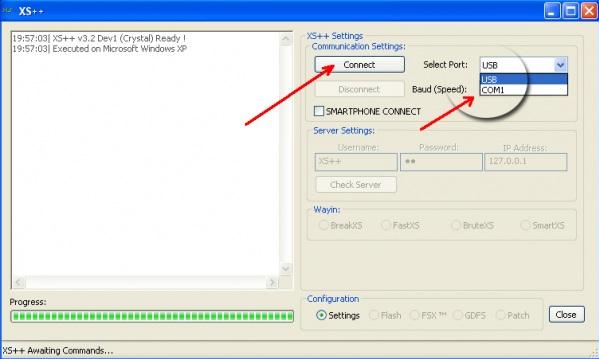
XS + + is a tool that can be used for flashing your Sony Ericsson. To do flashing with this tool, you do not need a flasher box, which you need only a data cable (data cable which is used to transfer data), this cable is usually included in the package.

The most important thing to consider when going to do the flashing is the condition of mobile phone battery. Make sure that phone battery fully charged more than half. Previously I've written a post about the tutorial using XS + +, but in this latest post I will share in the form of video tutorials.

Please download the tutorial video here. 

Sunday, 21 November 2010

Nokia N73 On/Off Button Problem

Nokia N73 is a Nokia phone that has a feature that is quite complete. The phone is also in great demand in the market that can easily be found in the hands of consumers.

Most problems that occur on the Nokia N73 is a disruption in the software, but it is also possible disturbances of the hardware also occur. One case of hardware malfunction Nokia N73 that I have ever found is the damage to the power button. There are several categories of damage in this section, but the worst is when the copper layer to attach the switch is broken. To overcome this we need a schematic diagram that is useful to guide us find the right path.

To get a schematic diagram of the Nokia N73, you can visit the site Schematic Diagram. There you can download various schematic diagram of mobile phones, especially Nokia. Here is a picture guide to repair damaged power button Nokia N73, please be stored.
Good luck!  

Tuesday, 16 November 2010

I-Phone Secret Codes

Do you have an iPhone? If yes, maybe you're looking for the secret code for iPhone? Like Nokia, Sony Ericsson, Samsung, and others, iPhone also has some secret code that can be used to find information about these devices.


In this post, Phone Repairing will share a secret code for iPhone. Please continue reading.
 
  • *3001#12345#* and tab Call. Enter field mode. Field mode reveals many of inner settings of your iPhone, specifically up-to-date network and cell information.
  • *#06#, display your IMEI number. This code is the same as mobile code in general.
  • *777# and tab Call. Account balance for Prepaid iPhone.
  • *225# and tab Call. Bill balance (PostPaid only).
  • *646# and tab Call. Check minutes (PostPaid only).
  • *#21# and tab Call. Setting interrogation for call forwards. Discover the settings for your call forwarding. You'll see whether you have voice, data, fax, sms, and others.
  • *#30# and tab Call. Calling line presentation check. This display whether you enabled or disabled the presentation of the calling line, presumably the number of party placing the call.
  • *#76# and the tab Call. Checking whether the connected line presentation is enabled or not. State whether the connected line presentation is enabled or disabled. Presumably similar to the calling line presentation.
  • *#43# and tab Call. Determine if call waiting is enabled.
  • *#61# and tab Call. Check the number of unanswered call.
  • *#62# and tab Call. Check the number for call forwarding if no service is available.
  • *#67# and tab Call. Check the number for call forwarding when the iPhone is busy. 
  • *#33# and tab Call. Check for call control bars.

Wednesday, 10 November 2010

Broken Keyboard Connector on Laptop Motherboard

Before I continue my post about mobile phone repair, I paste a trick to repair keyboard connectors on the motherboard laptop. Hopefully this can be useful for all readers of this blog.
Laptops have a lot in common with mobile phones, particularly in terms of connections between parts that use a very small connector so it is easily damaged. When we do the disassembly, if not careful in removing these connectors, it will cause damage to the connector. In some areas, like in my country, parts for laptops and mobile phone connector is quite difficult to find.
On this occasion, I'll share a trick to repair defective laptop keyboard connector. If you owned a laptop keyboard connector is damaged, there are only two options you can take, namely to replace the entire motherboard with a new laptop or use the external keyboard attached via USB. Why should replace the entire motherboard laptop? As I mentioned above that the spare parts for laptop keyboard connector is very hard to find or even not available in the market. But calm down, please try tricks that I share the following will, hopefully can be useful for you who have problems with your laptop keyboard.
The following figure is an example of a broken laptop keyboard connector.
In the picture above, you can see that the lock is broken at the edges (brown part). Thus, it can not lock the keyboard cable. But still, do not waste lock because we still can use it with add a little trick. How to install the broken clip? Ok, this is the steps.
Position the broken clip the way it was before. In this case, both sides of the connector are broken. Carefully insert the keyboard cable into the connector. Note, in this type of connector, the cable goes above the locking clip. Look at the picture below.

Carefully push the broken clip back in place. You can use a small screwdriver to push on the clip behind the cable. The clip fits tightly when there is a cable inside the connector.
Then, secure the connection with the sticky tape and you should be good to go. The keyboard should work just fine. Look at the picture.

Sunday, 24 October 2010

Nokia E75 Hardware Solution

Have a problem with your Nokia E75? Don't worry, Phone Repairing will share hardware repair collection for your Nokia E75.

In this software you will find a variety of guidance in overcoming the damage hardware such as Bluetooth, MMC, Ringer, local mode, keypad, charging, and others. Download the file here.

Monday, 18 October 2010

Nokia 6233 Charging Problem Solution

Here is Nokia 6233 charging problem solution, download the picture here and solve your problem.

Hopefully useful!

Sunday, 26 September 2010

Nokia N70 APE Regulator Problem

Here are some jumpers techniques for problems that occur in APE Regulators Nokia N70.

When a problem occurs with APE regulator, one of the solutions we can apply is to remove IC. However, by removing the APE regulator, there are some parts on phones that lack of tension that can cause some damage, such as:
  • The phone only shows a white screen (blank)
  • The phone displays the logo of Nokia, but can not continue the boot process.
When we remove the APE regulator, then we have to make some jumpers. Please see the following picture:


Jumper No. 1 is to overcome the problems that occurred, ie the phone only displays the logo of Nokia, but it can not continue the boot process. While the jumper No. 2 done to overcome the problems that occurred, ie the phone only displays a white screen (blank).


Hopefully helpful!

Saturday, 18 September 2010

Flashing Sony Ericsson Online

Sony Ericsson is one of most famous mobile phones brand like Nokia. Problems that often occur at the Sony Ericsson is blinking, that is the screen flickering.
To overcome this problem, we can use software flasher such SE Tool. However, if we do not have the box, there is an alternative that we can use that is by using a software called Update Service.
Some advantages of this software are compared using box:
  1. No need to use box, making it much simpler and cheaper.
  2. No need to bother with the firmware because this software automatically searches for the firmware on the connected phone.
  3. Anyone can do it for having an internet connection, no need to have knowledge about mobile phone repair techniques.
Interested? Please download here

Thursday, 16 September 2010

Samsung Software Tools Download

Samsung is one of mobile phones producer that have many various product. Samsung mobile phones is one of famous and interested brand by customers.
Here is a software to repair or flash your Samsung mobile phones. This software applicable for this model : SGH-S10x/S20x/S30x/S300M/S341i/S342i/S400i/S410i/S500i SGH-E300/E310/E320/E530/E600/E610/E618/E620/ E720E750/E770/E778/E810/E850/E860V/E880E910 SGH-P100/P107/P108/P207/P300/P400/P705/P710/P720/P730 SGH-X105/X120/X138/X140/X150/X200/X40x X300/X430X438/X450//X480/X610/X660/X800/X810/X900 SGH-D100/D300/D410//D550/D800 SGH-C120/C200/C210/C230 SGH-i505/i700/i300 SGH-V20x SGH-N710 etc..
For you who need this Samsung software tool, you can download it here. Tell me if there are a broken link in this blog.

Wednesday, 8 September 2010

How to Repair Laptops Battery Charging Problems

Phone Repairing have good news for the visitors. Now, besides discussing about mobile repair, this blog will also discuss your laptop repair techniques. We got new speakers to write on this blog that will share ways to repair damaged laptop computer.
Ok, let's start the first discussion about the laptop computer repair techniques.The first problem we discuss is the battery problem. Just like mobile phones, laptop computers use a battery as a power source that makes it easy to carry wherever you go. However, like cell phones, laptop computers at any common problems in the charging process.There are some symptoms of damage to the laptop computer battery charging process. Here we will discuss one by one.
Laptop detects the battery but shuts off when AC adapter unplugged
When you place the mouse cursor on the battery icon on your laptop screen while the laptop is connected to the AC adapter, it show the remaining battery charge and there are writing "charging". You can see in the picture below :

The battery power meter utility (if available) also shows that battery is connected and charging. Look at the picture below :

But the problem occurs when you unplug the AC adapter, the laptop shuts off completely. If you have problems like this, here is the analysis of possible causes of damage.
  1. The battery not installed correctly, remove the battery and reinstall.
  2. The battery contacts got dirty or oxidized and the battery connection not good with the motherboard. Try reconnecting the battery a few times.
  3. If reconnecting the battery doesn't help your problem, most likely the battery is bad and has to be replaced with the new one.
  4. If you replaced the battery and the problem still exists, may be the problem occurs in the motherboard. Apparently the battery charging circuit has failed. In this case, the whole motherboard has to be replaced (or repaired on component level). 
The battery not detected by the laptop
When you sure that the battery connected correctly and the battery condition is still good, but you see the red cross on the laptop screen in the battery icon, like the picture below:

For this problem, there are several possibilities that can cause this happen, namely:
  1. Most likely the battery is bad. Try to replace the battery with the new one to make you sure.
  2. If replacing the battery doesn't help, this is motherboard related failure. You have to replace the motherboard (or repairing on component level).
The battery discharges very quickly after it reaches some critical point.
The battery detected by the laptop and charges properly to 100%. When you unplug the AC adapter, it take normal time to discharge until some critical point (ex. 75%). But after that, the battery discharges very quickly to 0%.
If this is happen to your laptop computers, it was caused by the battery has been damaged or their condition was not good. Replace the battery with the new one.

The battery charges only if the power plug positioned correctly.
You have to wiggle the power plug in to charge the battery. After you find the right position, the battery charges properly.
If this happen on your laptop, there are several possibilities that cause this, namely:
  1. AC adapter failure. The AC adapter power cable is damaged. You can test it using AVO meter.
  2. If the AC adapter works fine, most likely this is power jack (connector where you plug power adapter) failure. You have to replace the connector.
In some laptop models, the power jack is not soldered to the motherboard, it's attached to a power harness. For example you can see in the picture below:


Hopefully useful, visit this blog regularly to find new post about mobile phones and laptops repairing guide.
 

Thursday, 2 September 2010

Samsung Mobiles

Samsung mobiles today released their latest product range with very competitive prices. Although with a very competitive price, Samsung mobiles do not rule out the quality, their products still have a good quality.
Samsung mobiles phones known as the pioneer manufacturers of stylish. One of the first product made is the Samsung A800. Currently the technology is installed on samsung phones is becoming more sophisticated and they are still promoting the stylish as their hallmark.
For the mobile engineer, here I have a tool that can help you in repairing Samsung phones. Please feel free to those in need can be downloaded here, and if there are problems, you can consult with me through the form in the sidebar.

Tuesday, 31 August 2010

Nokia 6300 MMC Problem

Nokia 6300 is one of Nokia phones quite a lot of consumer demand, but this phone has several weaknesses which are often damaged on the memory card, charger, and audio (headset).
In a previous post I share how to fix the mic problem on Nokia 6300. This time I share a picture guide to repair damage to your memory card (MMC) corrupted. Please for your friends who need it, download the images below.
Please download the picture here.

Thursday, 19 August 2010

Nokia 6300 Mic Solution

Nokia 6300 are often damaged in the audio section, especially the microphone. In this section I want to share ways to repair damage to the Nokia 6300 microphone.The following trick is to take off an IC, then do the wiring between the mic with the components around the IC is removed. Here is a picture, hopefully useful.
Please download the picture here.

Wednesday, 14 July 2010

Nokia 7610c Service Manual

After I shared earlier about the Nokia 7610c hardware repair guide, now  Phone Repairing also will share service manual Nokia 7610c.
Service manual has an important role in helping us to do repair phones. With the service manual, the work we do will be more systematic and focused.
Please download the service manual Nokia 7610c here.

Saturday, 10 July 2010

Nokia 7610s Hardware Repair

Here is Nokia 7610s hardware repair guide. The following pictures are a series of author's experience in performing repair Nokia 7610s.
Nokia 7610s in a collection of pictures of this, you will find a guide to repair damage to the mic, camera, keypad, network, charge, mmc, radios, LED, and others. Please download here.

Monday, 7 June 2010

Nokia 3120c Hardware Repair Guide

Here is your Nokia 3120c hardware repair guide. Don't waste your time, lets download the file here.

Wednesday, 12 May 2010

RSDlite Tutorial

In a previous post, Phone Repairing has provided the software for flashing Motorola phone called RSDlite.
In this posting, Phone Repairing will give a tutorial using software RSDlite. RSDlite tutorial was created in PDF format, and you can download the file here.
In this tutorial ebook, We explained how the software installation process until how to use this software for flashing Motorola mobile phone.
Please download the tutorial here.

Tuesday, 11 May 2010

Tips and Trick Flashing Motorola without Boxes

To repair Motorola mobile phones such as lcd blank, restart, and others, We can do with the flashing process. Generally We need box repair to do this, but now, Phone Repairing try to share how to do flashing Motorola mobile phone software without boxes.

To do this, we need a software that called RSDlite. By using this software, we only need USB P2K and Mini USB data cable.
For this time, We share the software first and the tutorial will be given in the next post. You can download RSDlite here.

Thursday, 6 May 2010

XS++ Software Tutorial

In a previous post, I've provided software XS++ which can be used to repair Sony Ericsson mobile phones. If there is not yet know how to use XS++ software, please download XS++ tutorial that covers how to do full flashing, back up and restore GDFS.

This XS++ tutorial is presented in video form, so it will be easier for you to understand how to use it. Download the file here.

Monday, 3 May 2010

Flashing Sony Ericsson Mobile Phone Without Box

Flashing Sony Ericsson mobile phones usually use boxes like SE Tool. However, there are other alternatives that can be achieved if there is damage to the software on Sony Ericsson mobile phone is by using the XS++ software.
To do this, we only need :
  • DCU 60 cable (latest Sony Ericsson data cable)
  • XS++ Software
  • Sony Ericsson mobile phones firmware
This software's interface is as follows :
Here I provide XS++ software for you, download here. About how to use it, I'll give it to the next posting. Please wait ...

Wednesday, 28 April 2010

Nokia 1200-1650-1202-1661 Repair Solution

Here is Nokia 1200, 1650, 1202, and 1661 repair guide. In this file, you can find mic, charging, speaker, and keypad repair guide.
In this file is divided into two parts, the left is a repair guide for Nokia 1200 and 1650. The right is a repair guide for Nokia 1202 and 1661.
Below is the screenshot :
If you need this Nokia 1200 and friends guide, download here.

Friday, 23 April 2010

Phoenix Service Software 2010

Phoenix Service Software is a tool that is used to repair damage to a mobile phone software. This tool is specifically used to repair Nokia mobile phone. Excess use of this software is that when we do repairs, we do not need the flasher box as is, we only need a data cable like DKU2 and so forth.
Phoenix Service Software 2010 is revised from previous versions. In this latest version, added some new products like the RM-601, RM-656, RM-657, RM-659, RM-559, RM-610, RM-618, RM-639, RM-632, RM-633, and RM-634. In addition, many other features that more complete when compared with the previous version.
Phoenix Service Software is very easy to use, as well as the installation process is very fast. For those who need this software, please download here for free.

Friday, 16 April 2010

Samsung Mobile Phones Service Manual (Part 1)

Samsung mobile phones is one of the most popular mobile phones among the mobile phones brands, in addition because of the features, also it influenced by the design that is very stylish.
Therefore, in this section, I want to share a service manual samsung phone. Probably among my friends there who do not have it, you can download it from here.
I share this page into several parts because the process of uploading to file hosting and also because some other activity. Therefore, if there are service manuals that you need me to put here yet, you can contact me via the form provided on the right.

Monday, 5 April 2010

Repair a China Mobile Phones

If you want to fix or repair Chinese mobile phone, consider the following points :
  1. CPU type
  2. Flash Chip model
  3. Original software / flash file version
  4. Phone TX RX
Flash file version is very important. If you lose or do not know the original file version, you will find some problems when doing repairs, suc as :
  • Flash done but phone dead
  • White screen (no incoming / outgoing call)
  • White screen (with incoming / outgoing call)
  • Keypad not work
  • Sim card not valid
  • Sim blocked
  • Hang after power on
  • No network
  • Have network but show emergency (this problem also do for power IC or bad connect Sim or Sim connector problem)
  • Phone restart continuously
  • Etc.
Hopefully useful and thanks to Mr. Tkowsar

Tuesday, 30 March 2010

Sony Ericsson Z310i SIM Card Repair

Sony Ericsson Z310i is a clamshell model. This is a stylish mobile phone. This mobile phone support GSM, GPRS, and EDGE and can run in 4 bands, namely 850, 900, 1800, and 1900.
The display use color STN with 65.536 colors. Internal memory for this phone is 14 MB, but you can't add external memory. With this phone, you can customize your ringtone setting because this phone support AAC, MP3, Polyfone ringtones.
This post will not discuss about the specification by details, but through this post, We will share about how to repair the mobile phones if in the future its damaged. This post especially will share about how to repair SIM Card problem with chip missing.
I found a case of Sony Ericsson Z310i SIM Card problem with R1523 and C1510 missing. The location of that parts near the SIM Card connector. To solve this problem, you can connect directly from the Sim Card connector to R1515. The location is below :

Connect the path using a thin wire as marked with red dot. It is 100% worked and I have tested it.
If you need the schematic of Z310i, you can download here.
Good Luck.

Monday, 29 March 2010

Sony Ericsson T610-T630 Repair Guide

Sony Ericsson T610 is a middle-end mobile phones. This mobile phones have 128 x 160 pixel LCD with 65,536 color STN. T610 working in three band GSM, ie GSM 900, GSM 1800, and GSM 1900.
If you want to add a java application, you can do it because this phone support java. Another features that is bluetooth, infrared, modem, email, is useful features.
Now, we are talking about the damage. Damage that often occurs in Sony Ericsson T610 are insert Simcard, Buzzer, and Camera operation. To repair this damage, you can follow this guide :
T610 sim card repair guide
T610 buzzer repair guide
T610 camera repair guide

Monday, 22 March 2010

Sony Ericsson Z520i Disassembly Guide

For some people, maybe it is hard to assembly or disassembly a mobile phones, especially flip or slide model mobile phones like Sony Ericsson Z520i. The damage that often occur in this model is flexible wire. When the flexible wire broken, it can cause a damage like no display etc.
To improve or repair this damage, of course we have to replace the flexible wire with the new one. But, to replace it, we must disassembly the phone first. Therefore, in this section, Phone Repairing will provide a guide about how to dismantle or disassembly the Sony Ericsson Z520i.
Check it out :


Sunday, 21 March 2010

Repair Nokia N96 Restart on Nokia Logo

Here I get from other source about how to repair Nokia N96 restart on Nokia logo. There are some method that you can do. Below are the explanation :
First Method :
  1. Make full backup from phone service => IMEI & security => IMEI Rebuild => Back Up RPL all section
  2. Erase phone with Universal_BB5erase_RAPIDO_MCU.bin and Enable Skip APE (put the file in MCU)
  3. Flash phone with N95-8GB, RM-320 version 30.0.018 only MCU and PPM files with Enable Skip APE
  4. Flash phone with N96 Eno file RM-247 Eno. You can download the file here
  5. Flash phone with version 30.033 N96 RM-247
  6. Write full back up service => IMEI & security => IMEI rebuild => Write RPL

Second Method :
  1. Make full back up from phone service => Imei & security => Imei rebuild => back up RPL all section
  2. Downgrade phone without enable downgrade option
  3. Repair Simlock service => Imei & security => Simlock => PA SL-2 => Make simlock RPL => repair Simlock
  4. Repair superdongle service => Imei & security => Imei rebuild => Repair SD
  5. Sx4 through SuperSD Auth key, and write PM field 1 and 309
  6. If certificate damaged, repair it by the press recover cert. service => phone test => various => BB5 certificate validation (for check validation certificate)
Third Method :
  1. Make full backup from phone service => IMEI & security => IMEI Rebuild => Back Up RPL all section
  2. Repair Simlock service => Imei & security => Simlock => PA_SL2 => Make simlock RPL => Repair simlock
  3. Repair superdongle service => Imei & security => Imei rebuild => repair SD
  4. Sx4 through SuperSD Auth Key, and write PM field 1 and 309
  5. If certificate damaged, repair it by the press recover cert. service => phone test => various => BB5 certificate validation (for check validation certificate)
  6. Full flash with N96 last version (4 files)
Note : The first method used when the phones part of the security and certificate is completely healthy (Simlock-SD-HWC_CCC-Sec Test is OK).
Thanks for Mr. Y.P.Y for this information.

Friday, 19 March 2010

Sony Ericsson SIM Card Repair Guide

Have a problem with your Sony Ericsson SIM Card? Don't worry, here you can find some repair guide for SE SIM Card. Download the file for free here...
Download Sony Ericsson SIM Card Repair Guide 1
Download Sony Ericsson SIM Card Repair Guide 2

Wednesday, 10 March 2010

Nokia 5130xpress music schematic

According to Mr. Pakar's request, here Phone Repairing will share the Nokia 5130xpress music schematic diagram. The request is about keypad IC of Nokia 5130, but we give the schematic because with full schematic diagram, you can make an analysis more comprehensive.
The location of the keypad IC is as showed by the picture below :
There are two ICs ie. Z2401 and Z2402. The location is near the flasher cable interface as you can see from the picture above. To download the schematic diagram, you can use the following link :

Download schematic

Password : mobile-repair-guide.blogspot.com

Tuesday, 2 March 2010

Complete Nokia BB5 Schematic Diagram

Hello,
Several days ago, Phone Repairing didn't update article in this blog because we were busy with our jobs :) . But don't worry, today we will give you something that very important for mobile phones technician.
Now, we will share Nokia BB5 schematics diagram including Nokia 3110c, N70, N71, N80, and others. All the schematic written in pdf format, but in the following file, all pdf files packaged in a nice software. With this software you can choose Nokia BB5 schematic easily. I think its good if we called this software with portable nokia BB5 schematic diagram :)
This is the screen shot of the software :
 
The size is 148 MB, yes its big. If you have a slow internet connection, you must be patient when downloading the file. Okay, don't waste your time, download it now for free, yes its free for you :)

Tuesday, 23 February 2010

Sony Ericsson Joystick Repair

In My previous posting, I've wrote about Sony Ericsson jumper that you can download. Now, the other jumper guide for your Sony Ericsson mobile phones that using Joystick like J200, K700, K500, etc will presented to you.
This is 100% working and I have tested it. Check it out :

Sunday, 14 February 2010

All Nokia PM Download

For everyone who need PM files for All Nokia mobile phones, this is the files for you and download for free :

Pm All Nokia (1)
Pm All Nokia (2)
Pm All Nokia (3)
Pm All Nokia (4)
Pm All Nokia (5)
Pm All Nokia (6)
Enjoy and Good Luck....

Thursday, 11 February 2010

Samsung Hardware Repair Guide

Here are Samsung Hardware Repair Guide. Here you can find many problem solving guide for your Samsung mobile phones. Please download from link below :

Samsung Repair Guide

Tuesday, 9 February 2010

Secret Codes For Blackberry Phones

Blackberry has become a new phenomenon in the world of telecommunications. Blackberry is now a trend that is loved by most people. Popularity Blackberry makes some phone vendors to design products that is almost similar to the Blackberry.By the way Blackberry problem, here are some secret code that can be applied to overcome the damage on your Blackberry. Please be stored.

Blackberry Secret Codes
  • Left SHIFT + Right ALT + Del. This is master reset Blackberry. Press and hold them until LCD switched off and RED BLINKING LED. Remember, all your data in your phone will be lost.
  • ALT + Right SHIFT + Del. This is secret codes to restart Blackberry without release the battery. This codes use to refresh memory or to configure after you install an application.
Remember, all is your own risk. I Just share......

Monday, 8 February 2010

Nokia 3110c Manual Format

In a previous post, Phone Repairing discusses how to manually format on mobile phones such as Nokia WD2 Nokia 6600, 7610 and so on. This time, we provide a way to manually format on mobile phones Nokia 3110c, 3500, and the like. This type of mobile phones often have problems in software.
Some types of damage that often occurs is not able to open the gallery, a white screen and so on. To overcome this, we can do it manually format without using Flasher box. The trick is to press the keys *, #, and the on / off simultaneously.
For more details, can be seen in the picture below:
 Good luck.

Monday, 1 February 2010

How to Update your UFS Box?

For some people may not know how to update the software UFS Tornado. To update your software UFS Tornado, done online. Here is a video update process, please watch :

Nokia 6300 LCD Problem

Nokia 6300 mobile phones are mobile phones which belong to the group BB5. These mobile phones have a fairly complete feature, music and camera quality is amazing.Some time ago, we received the task to repair the damage that occurs in the Nokia 6300 mobile phones. Damage occurs on the LCD, when mobile phones turned on, the screen displays only a white color but the phone can receive calls or make calls.At first we thought that the damage occurred on the LCD, but after we tried with good condition LCDs, mobile phones still show the same damage. After we did the examination on the part of the active component, there was no problem and the problem actually occurs in the passive components Capasitor.Although it rarely happens, but chances are it will stay there as we experienced. Capasitor who experience these problems is C2402. Here is the location of these components.

Wednesday, 27 January 2010

LG mobile phones repair manual

Here is a guide to repair the damage LG mobile phones. This form of exe files, so you can execute without needing the help of other programs.
In the following files, you will find a guide repair LG G1600, LG G1610, LG 1800, LG 2300, LG 2320, LG 5300 and LG KG800. Please download for free and hopefully useful.

Friday, 22 January 2010

Nokia DCT-4 Flashing Guide

Hello friends ...
Some days I am very busy with offline tasks so that I rarely update this blog. However, this time I want to go back to share information with friends all about doing tricks on the mobile phone flashing Nokia DCT-4 is the case this time I use the Nokia 1600.

The case this time is the mobile phone always restart. Of course we all understand that this is caused by damage or inconvenience caused to mobile phone software. However, when I try to do flashing, mobile phones do not want to go to the local mode. When I click the tab info on Tornado UFS interface, mobile data can not be read. Then I tried directly to flashing. At the time I did the flashing, to erase the first area, second and third successful, but in the fourth area failed process.
If you find a similar case as I have, you can try tricks like I do. We do the settings in the "Skip erase from the area" from the default value becomes the value of the failed area removed. However, these new tricks I tried on a mobile phone, so I myself can not conclude that this trick can be applied to other models with the same case. Nokia 1600 which I flash with these tricks are now back to normal.
The settings I do it you can see in the following picture :


Monday, 18 January 2010

Nokia 3500 Classic switch on/off Problems

Some days I am busy with work offline, so this time I only had time to add the posting on this blog. We apologize to visitors if there is a question that responded late. Here's a troubleshooting guide for switching on / off button on the Nokia 3500 classic mobile phones. Damage to switch on / off mobile phones, mostly caused by a broken line, therefore, to be able to reconnect the broken lines correctly, we need help Schematic diagram.
In the case of the Nokia 3500 classic, here is a Schematic diagram of the switch on / off :


In Schematic diagram, we can see that the switch on / off connected to the ground and the L2405. Thus, the first step is to examine these points, whether connected with the good or not. If good, continue the examination of further components. And so on until the break point was found. The location of these components in the PCB board are as follows:


If you need a Schematic diagram of the Nokia 3500 in full, please download here.

Saturday, 16 January 2010

Nokia 6020 problem

Some time ago I got a job again, which is to repair the Nokia 6020. Early damage, this phone does get wet. The owner forgot to remove it from his pants pocket, then pants are inserted into the machine, you'll know what happened? Mobile Nokia 6020 is dead.
The first step I do is wash the PCB board with ultrasonic cleaner. Once dry, I try to turn the mobile phone and turned it on. However, problems still occur on a mobile phone when not fitted with a SIM card, mobile phone power on normally. However, when installed SIM Card, phone alive but died instantly.

This happens because the IC PA problematic. To ensure that the PA problem, you may remove the L7700. These components are connected with Vbatt PA IC. After removing L7700, turn on the phone with a SIM card, when lit with a normal mobile phone (without signal of course), then certainly there are problems in the Power Amplifier IC. Change the Power Amplifier IC with the new one.